|
1. What kinds of securities can I trade through your Internet Trading System? You can buy and sell all stocks, Exchange Traded Funds and warrants listed on the Stock Exchange of Hong Kong. You can also trade other financial products through our system such as debt securities, NASDAQ-AMEX Pilot Program shares, A-shares and Exchange Traded Funds eligible to be traded under the Shanghai/Shenzhen-Hong Kong Stock Connect, iShares, etc. which are available to be traded via the Stock Exchange of Hong Kong through our system.
2. How can I benefit from using your Internet Trading System? The brokerage fee for orders placed and executed through our Internet Trading System is as low as 0.18% (minimum HK$80.00). Orders placed and executed through our dealers incur a brokerage fee of just 0.25% (minimum HK$100.00).
3. Can I get real-time stock quotes? We provide two types of online real-time stock quote services for you to choose from: Continuous Access and Per Quote Access. For Continuous Access, the monthly charge is HK$320.00 – this charge will be waived if your aggregate transaction volume exceeds HK$500,000.00 per month. With Per Quote Access, you can receive an initial 300 free quotes per month and an additional 200 free quotes for every HK$50,000.00 in transaction volume you accumulated by the end of the month (unused free quotes will not be carried forward to next month).
4. Can I change my log-in password? You can change your password at any time by clicking the "Account" button and selecting "Change Password" after successful logging in to our Internet Trading System. You should change your password periodically and should not re-use passwords that you have used before. To enhance your security in using our Online Securities Services, your personal identification number (“PIN”) should consist of 8 to 12 alphanumeric characters.
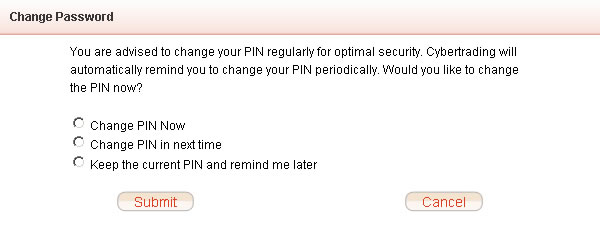
5. What should I do if I have lost my password or my password has become invalid? You should immediately call our dealers on (852) 2308 8200 or our enquiry hotline on (852) 3608 8021 for assistance. We will issue you with a new password. 6. Will my login password expire if I have not logged in to my account for a long time? For your protection, if you do not log in to your online account for a continuous period of 60 days, our Cybertrading system will display the password-change screen reminding you to change your internet login password when you login our system again. You can either change your password or keep the existing password.
7. What can I do if a problem occurs while I am placing orders through your automated channels, e.g. through internet trading, mobile trading, or automated hotline? To avoid incorrect instructions or duplication of orders, you should immediately call our dealers on (852) 2308 8200 to confirm the latest status of your orders.
8. Can I place orders by email instead of through the internet trading system? Do not send orders to us by email, as emails are not a secure communication method. You should only place buy/sell orders through our online trading system. 9. When will I receive email notifications? You will receive an email notification at your registered email address when you perform any of the following activities: - Log in to the Online Securities Services; - Execute an order; - Change account information (only applies to the Cybertrading platform).
10. Can I stop receiving login email notifications from East Asia Securities? This is not permitted. In accordance with guidelines from the Securities and Futures Commission, we are obliged to notify clients immediately every time they log in to our Cyber Securities service.
CORPORATE ACTIONS 1. In addition to submit corporate action instructions by mailing an instruction letter, can I submit corporate action instructions via other channels? You can also submit corporate action instructions for your account portfolio of local securities via Cybertrading/Mobile App. Corporate actions available for local securities include: rights subscription, preferential offer/open offer subscription and election for dividend with options.
2. What are the advantages of submitting corporate action instructions via Cybertrading/Mobile App? Cybertrading/Mobile App is the instant, convenient channel that allows you to avoid the risks associated with delivering instructions by post.
3. When can I submit corporate action instructions via Cybertrading/Mobile App? When there is corporate action for related securities, we will issue the related electronic or paper advice to the qualified shareholder. You can submit the corporate action instructions via Cybertrading/Mobile App before our reply deadline.
4. Is there any charge for submitting corporate action instructions via Cybertrading/Mobile App? No, this service is free of charge. However, there are charges for different corporate actions. For details, please refer to the Fees and Charges Disclosure Sheet for Hong Kong Securities Transactions which can be found on our website.
5. Can I still submit corporate action instructions by mail? Yes. You can choose to submit an instruction via Cybertrading/Mobile App or by mailing an instruction letter. However, please do not submit duplicate instructions via different channels. If we receive more than one instruction for a corporate action, we shall have discretion over whether to process any or none of the instructions. If there is an insufficient quantity of related shares and/or subscription monies for us to process all of your corporate action instructions, we reserve the sole discretion to stop processing all of your instructions without prior notice and we will not be responsible or liable for any loss incurred. 6. Where can I get the information on the corporate actions requiring my instruction? You can get the information on the corporate actions requiring your instruction via: 1. The electronic and paper advice that we publish regarding corporate actions (you can also call our hotline for enquiries); 2. The "Corporate Action" page on the Cybertrading/Mobile App, which will display information on the corporate actions relevant to you until their respective reply deadlines; and/or 3. Circulars posted by listed companies in the "Listed Company Information" section of the HKEXnews website.
7. If I have submitted more than one instruction under the same account for the same corporate action, what will happen? We do not accept more than one instruction under the same account for the same corporate action. You should note that if you submit more than one instruction through various channels, including mail, Cybertrading/Mobile App, and any other applicable channels, we shall have discretion over whether to process any or none of the instructions without prior notice and we will not be responsible or liable for any loss incurred.
8. If I want to submit an instruction for my joint account via Cybertrading/Mobile App, what should I pay attention to? Any of the holders of a joint account can submit instructions for corporate actions via Cybertrading/Mobile App. Please note that only one instruction from any holders of a joint account is required for each corporate action. If more than one of the holders of a joint account submit instructions for the corporate action, we shall have discretion over whether to process any or none of the instructions without prior notice and we will not be responsible or liable for any loss incurred. 9. Can I submit a corporate action instruction via Cybertrading/Mobile App in advance of an expected corporate action? No. You can only submit corporate action instructions via Cybertrading/Mobile App after we have issued electronic or paper advice informing you of the details of a corporate action.
10. How can I check whether my corporate action instructions have been received by East Asia Securities Company Limited (“EAS”)? After you have submitted an instruction via Cybertrading/Mobile App, the acknowledgement page with the transaction details and reference number will be displayed. You will also receive an email for confirmation. If you do not receive such notification, please call our dealer at (852) 2308 8200 for enquiry to avoid missing submitted instructions or submitting duplicated instructions. Please note that the reference number only represents the acknowledgement of receipt of your instruction by us. The execution of your instruction is subject to your account situation.
11. Can I amend or cancel my corporate action instructions via Cybertrading/Mobile App? No, you cannot amend or cancel your corporate action instructions via Cybertrading/Mobile App. If you need to amend or cancel a submitted instruction, please contact us at (852)2308 8200 for assistance before our reply deadline. Note that such amendments or cancellations are not guaranteed and will be depended on the situation. 12. I am an overseas customer. What should I pay attention to when submitting corporate action instructions via Cybertrading/Mobile App? If you are overseas customer and want to submit a corporate action instruction, it is your responsibility to ensure that you have complied with the laws of all relevant jurisdictions, including obtaining consent from governmental and/or other bodies and complying with all other necessary handling procedures.
13. How can I calculate my entitled shareholdings, as stated on the corporate action reply form? (Only applicable to rights subscription and open offer subscription)? Your entitled shareholdings are calculated based on your available holdings. Your purchase shares will only be reflected in your entitled shareholdings after the system back-up has been completed on each trading day. The system back-up is conducted from 9:00 p.m. to 12:00 midnight on each trading day and the system displays data on previous business day until the backup is completed.
14. If I submit an instruction on a non-working day via Cybertrading/Mobile App, when will it be processed? Instructions submitted via Cybertrading/Mobile App on a non-working day will be handled on the next working day.
1. How can I open a securities trading account? EAS has provided you the service of opening stock options account and margin account. Regarding the account opening requirements and procedures, please click "About Us" for more information. For more details on account opening issue, please contact our Customer Service Hotline at (852) 3608 8021 for enquiry.
2. Are there any service charges for opening of a securities trading account? Opening of accounts is free of charge. For further information, please click "Commission Charges" under the "About Us" function.
3. If I have a securities trading account with East Asia Securities already, do I need to open another account for Internet Trading? For existing clients, it is not necessary to open a new account for Internet Trading. You only need to notify us in writing and provide us with your e-mail address for sending you the initial password as well as other e-mail messages in future.
4. When will I be able to use my Internet Trading account? After you have signed the relevant service application forms and furnished us with all the necessary supporting documents, we will send you the Internet Trading password through e-mail within 1 working day. Upon receipt of the password, you are required to change the password and then you can start using your account immediately. 1. What kinds of order can I place through your Internet Trading System? You can place Day Order. Day Order means that the order will be cancelled after market close if not executed.
2. Can I place buy order if my bank account does not have sufficient funds at the time of order placing? If there is insufficient funds in your bank account, we shall not be obliged to execute your buy order partially or at all. However, if we approve the buy order despite insufficient funds in your bank account, you are obliged to deposit sufficient funds into your bank account before the settlement date. Any overdue settlement will be subject to overdue interest.
3. How can I know that my placed order has been received by your Internet Trading System? When our system has received your order, it will send you a message with a unique order number through e-mail immediately. Once your order has been executed, cancelled or rejected, an e-mail notification will also be sent to you.
4. What should I do if I could not receive the notification e-mail? Due to unpredictable traffic congestion and other reasons, there may be time lag or delays in the transmission of e-mail. In this case, you can check the e-mail messages sent by our Internet Trading System by clicking on the “Home” and then “Mailbox” buttons. Alternatively, you may contact our dealer at (852) 2308 8200 to confirm the most updated order status.
5. What should I do if I could not receive the notification SMS? Due to unpredictable traffic congestion and other reasons, there may be time lag or delays in the transmission of SMS. In this case, you can check the order status by clicking “Order Status” in our Mobile App. Alternatively, you may contact our dealer at (852) 2308 8200 to confirm the most updated order status.
6. Can I check, amend or cancel my placed order through your Internet Trading System? You can amend or cancel an outstanding order which has not yet been executed. Click on the "Order Management" button and you can amend or cancel the order by clicking on the "Amend" or "Cancel" button beside the order. In addition, you can click on the "Order History" to check your transaction history up to the last 90 days.
7. How can I know that my order has been amended or cancelled? Once you have submitted an amendment or cancellation of an outstanding order, you should click the "Order Management" button immediately to ascertain whether the order concerned has been amended or cancelled as requested. Besides, you may click the "Order History" button to check the updated order status. An email will also be sent to you as acknowledgement of receipt of your request for order amendment / cancellation or as confirmation of order updated/cancelled. In case your order concerned cannot be amended / cancelled as requested, please contact our dealer for assistance immediately.
8. After placing an order through Automated Phone Service or Mobile Service, can I amend / cancel the order through Internet? Yes, you can amend / cancel order through Internet if you have applied for the service.
9. Can I sell the stock bought on the same day through your Internet Trading System? Yes. You can sell the stock bought on the same day.
10. Under what circumstances will an order be rejected automatically by your Internet Trading System? With our straight-through order processing trading system, clients’ orders will be routed directly to the trading platform of the Stock Exchange of Hong Kong for execution. To avoid unnecessary delay and error, clients should pay attention to the following trading parameters when inputting the mandatory fields of an order: - Input of a Session Order BUY order with order price 10 price spreads higher than the prevailing ask price will be cancelled; - Input of a Session Order SELL order with order price 10 spreads lower than the prevailing bid price will be cancelled; - Increase in order quantity when the order status is "NEW" or "Q" will be rejected. In this case, the original order MUST be deleted first and then another new order should be placed; - Decrease in order quantity with increase/decrease in order price simultaneously is allowed irrespective of the order status is "Q" or "NEW"; - Input of a buy/sell order quantity greater than the -3,000- board lots will be rejected
11. What is Pre-opening session? Hong Kong Exchanges and Clearing Limited (HKEx) introduces a Pre-opening Session (9:00a.m. - before market open) for the securities market, which is an additional trading session of 30 minutes commencing before the Morning Trading Session. It allows orders to be input to the trading platform of the Stock Exchange of Hong Kong for a single price auction and transactions concluded before the commencement of the Morning Trading Session to be reported by brokers.
12. Which order type should be chosen when I place order at the Pre-opening session through your Internet Trading System? You are no longer required to select the order type manually when placing orders owing that the type of your submitted order will be defaulted as Session Order by our system automatically.
13. Can I amend or cancel the order during Pre-order Matching and Order Matching period of Pre-opening session from 9:15a.m. to 9:28a.m.? No order amendment/cancellation is allowed if your order is successfully submitted to the market for matching on or before 9:15a.m.
14. Can I place short-sell order through your Internet Trading System? No. Short-selling is not allowed.
15. Can I sell odd lot through your Internet Trading System? No. You should contact our dealer at (852) 2308 8200 for odd lot sell order.
16. Can I sell physical stock through your Internet Trading System? You can sell the physical stock through our Internet Trading System only after you have successfully deposited the physical stock into your securities trading account.
17. Will there be any statement issued to me for confirmation of trade? After your order has been executed, a daily consolidated statement will be provided to you via our e-Statement service or by postal mail for final confirmation of transactions. Besides, monthly e-statement or postal monthly statement will also be provided to client.
18. If I have securities deposited with other broker firm / bank under Central Clearing and Settlement System ("CCASS"), can I transfer them to your company? Yes, you can transfer the shares electronically to your securities account with us via Settlement Instruction method. You should complete and return a "Investor/ Securities Settlement Instruction" ("I.S.I."/ "S.I.") to us. For further information, please refer to the "Settlement Procedure" under the "About Us" function.
19. What do I need to do for settlement of trades? All trade settlements will be effected on T+2 day via direct debit / credit to your designated bank account. For purchase transaction, you should deposit sufficient funds into your designated bank account to cover the gross purchase amount and transaction fees before order placement. For sale transaction, the gross sale proceeds with all transaction charges deducted will be credited into your bank account on T+2 day.
20. What charges do I need to pay additionally other than the information mentioned in Fee and Charges Disclosure Sheet for securities transaction? Apart from the charges information mentioning in the Fee and Charges Disclosure Sheet for securities transaction, investors should be aware that investing in companies which incorporated in certain countries may be subject to various tax, including but not limited to capital gain tax on gains earned on a sale of shares imposed by Italian Authorities on Prada S.p.A., Financial Transaction Tax which applies to relevant transactions conducted on shares issued by companies incorporated in other foreign jurisdictions (e.g. France and Italy) and their related derivative products and listed in Hong Kong (e.g. Prada S.p.A.) and 10% dividend withholding when PRC enterprises distribute their dividends to non-resident enterprise shareholders as enterprises income tax, etc. Investors should understand relevant information and prepare to pay additional tax before making investment. 21. What price range is acceptable in order to amend Buy/Sell order in queue status during Continuous Trading Session? You should input the bid (ask) price within the range of the best ask (bid) price and not lower (higher) than 24 spreads of the best bid (ask) price. If the change request is exceeded the acceptable price range when transmitted to the system of Stock Exchange of Hong Kong, the change request will be cancelled and the original Buy/Sell order in queue status will also be cancelled. Please check the updated status of the Buy (Sell) order or contact us for enquiry if in doubt. 22. Can I amend outstanding order(s)? Order amendment is only applied in Hong Kong Stocks, you can amend the order price and / or order quantity, but the newly-input quantity should be the order quantity in total including the parts of executed quantity and outstanding quantity. Please be reminded that successfully amended order with new order price will be queued again. 23. Will I receive any email notifications for order placed in internet channel? You will receive email notifications which include but are not limited to the following statuses: new order, order is queued, fully executed order, partially executed order with cancellation of outstanding quantity, rejection of order due to order amendment, cancellation of order, and cancellation of order due to order expiration. 24. Will I receive any notification if my placed order for Hong Kong stock is partially executed before market close?An email notification will be delivered to you at 3:45pm (only applicable to Full-Day Trading) / 11:45am (only applicable to Half-Day Trading including Christmas Eve, New Year's Eve and Lunar New Year's Eve) on the same day if your order is submitted via internet trading platform. You may check the updated order status by using other trading channels anytime or contact our dealer on (852) 2308 8200 for enquiry if in doubt. 25. What is Session Order?You are no longer required to select any order type manually when placing orders through our cybertrading platform. Our system will automatically default the type of your submitted order as Session Order which will determine an appropriate order type according to the current or next trading session and dispatch your order to the market for matching and execution. 26. How to use Session Order?Since the order type of all your orders has been defaulted as Session Order in our system automatically, you are not required to change any order type manually. The following examples illustrate the mechanism of Session Order for your reference: Example 1: If you place order during Pre-opening Session, the type of your submitted Session Order will be determined as At-auction Limit order automatically and sent to HKEX for matching and execution. Example 2: If you place order during Continuous Trading Session, the type of your submitted Session Order will be determined as Enhanced Limit order automatically and sent to HKEX for matching and execution. Example 3: If you place order during Closing Auction Session, the type of your submitted Session Order will be determined as At-auction Limit order automatically and sent to HKEX for matching and execution. 27. What is Closing Auction Session?Under the arrangement of Closing Auction Session("CAS"), you will have up to 10 extra minutes to trade CAS securities at the allowable price limit. For more information, please visit the HKEX website. 28. Can I amend or cancel orders during No Cancellation Period and Random Closing Period in Closing Auction Session from 4:06p.m. to 4:10p.m.?No order amendment/cancellation is allowed during that period of time.
29. Can brokerage of transactions on the same trading day be consolidated?
Yes. The brokerage of multiple transactions on the same trading day will be consolidated, but it is limited to trade with same stock, trading category and trading channel (Electronic trading*/ Mobile App/ Contact Dealer).
Example:
Example for transactions which could be consolidated:
Example for transactions which could not be consolidated: - The trading channel of the forth order is traded through "Contact Dealer", which could not be consolidated with the first and second orders because of the different trading channels. Therefore, the minimum brokerage fee of $100 is charged. - The trading channel of the fifth order is traded through "Mobile App", which could not be consolidated with the first, second and the forth orders because of the different trading channels. Therefore, the minimum brokerage fee of $80 is charged. 30. What is the Volatility Control Mechanism (“VCM”)?The Volatility Control Mechanism introduced by HKEX is designed to prevent extreme price volatility from trading incidents such as a “flash crash” and algorithm errors, and to address systemic risks from the inter-connectedness of securities and derivatives markets. If the price deviates more than a predefined percentage within a specific timeframe, it will trigger a cooling-off period for five minutes. During the cooling-off period, you will allow to trade relevant securities and derivatives at the allowable price limit only until the end of the cooling-off period. 31. Which kind of securities are covered under VCM?The VCM is only applied to all constituent stocks of Hang Seng Composite LargeCap Index, Hang Seng Composite MidCap Index and Hang Seng Composite SmallCap Index. For more information, please visit HKEX’s website. 32. What is the applicable period for VCM?VCM is applicable to continuous trading session("CTS"), excluding the first 15 minutes of the morning and afternoon trading sessions, the last 20 minutes of the afternoon trading session (or morning CTS on half-day trading day). 33. How will the change/ new order instruction be handled when it is out of the price limit range during the cooling-off period of VCM?You can amend/ place a new order instruction outside the price limit during the cooling-off period. However, such instruction may not be handled immediately. To avoid incorrect instruction or duplication of order, you should immediately contact our dealer on (852) 2308 8200 to confirm the order status. 34. Why my queued order is being rejected though I have not amended it?Since the implementation of VCM, the queued order may be rejected if VCM is triggered for respective instruments. Hence, you should check the updated order status or immediately contact our dealer on (852) 2308 8200 for assistance if necessary.
35. What is the Hong Kong Investor Identification Regime (HKIDR) and the Over-the-Counter Securities Transaction Reporting Regime (OTCR)?
The HKIDR is a real name measure used for trading securities on the trading system of the Stock Exchange of Hong Kong ("SEHK"). Broker is required to disclose to SEHK a Broker-to-Client Assigned Number (“BCAN”) which includes relevant identifying information of the client at the time of submission of the client's trading transactions in accordance with SEHK's rules.
36. What is Fast Interface for New Issuance (FINI)? The Hong Kong Exchanges and Clearing Limited (“HKEX”) intends to introduce a new Initial Public Offering (“IPO”) settlement platform – FINI tentatively in the second quarter of 2023. Investors can subscribe for shares in either the public offer tranche (EIPO or “e-White” channels) or the international offer tranche of a Hong Kong IPO via FINI. 37. Why is this system implemented? It is based on the requirements of the SFC. It helps to identify investors who place orders, thus enhancing risk monitoring of the market. 38. Will my personal data be sent to the SEHK and the SFC under the HKIDR and the OTCR?With the express consent of the customer, the customer's personal data will be submitted to the SEHK and the SFC. The information submitted will be used by the regulators for market surveillance and monitoring purposes only and will not be made available for public inspection. 39. What is Client Identification Data? What information do I need to update?
For individual, client identification data includes the full name of the customer in English and Chinese, the issuing country or jurisdiction of the Identity document, the Identity document type and the Identity document number.
For corporate client, the identity document should be collected in order of (1) a Legal Entity Identifier ("LEI") registration document, (2) a Certificate of Incorporation, (3) a Business Registration Certificate or (4) other equivalent identity document. You must expressly agree to authorize us to submit your personal information (i.e., submit the broker client assigned code together with your Client Identification Data to the SEHK and the SFC) in order to continue trading after the implementation of the HKIDR, otherwise you can only place sell orders to sell your securities holdings. 42. Why do I need to give express consent for you to submit my personal data? As personal data is protected by the Personal Data (Privacy) Ordinance, we must obtain your express consent before we can submit your personal data, either by signing a paper consent form or by giving express consent to us to submit your personal data through the online trading platform or mobile application.
43. Do I need to provide separate express consent for each individual and joint account?
Yes, you must provide express consent for all your securities accounts with us. For joint account, all joint account holders have to provide their consents. 44. How can I give my consent for HKIDR on the online trading platform or mobile application?
Submission of consent via online channels is very simple. When you login the online stock trading platform or mobile application, the system will pop up the HKIDR Consent Form. If you agree to the consent clauses, simply tick the box at the bottom left and click the "Agree" button.
After the implementation of the HKIDR, you will no longer be able to place buy orders on the SEHK and will only be able to place sell orders to sell your securities holdings. And the normal trading services will be resumed after we have received your consent and completely updated your CID.
If you do not receive a rejection notice from us after you have submitted your consent, you can assume that the consent was provided successfully. As required by the SFC, client identification document need to be kept relevant and up-to-date. So when we conduct regular customer due diligence, and find that your identification document is outdated or do not meet the requirements, we will contact you to request for new identification document. If you fail to provide new identification documents within the specified period, we can only provide limited service to you after the deadline, i.e., only sell orders to sell the securities holding. 48. For further enquiry, who should I contact?
Please refer to the information provided by related parties:
1. How to apply for the Shanghai-Hong Kong Stock Connect (“SHSC”) or Shenzhen -Hong Kong Stock Connect (“SZSC”) service? Do I need to open another account for trading? No. If you have already maintained a securities account with EAS and a multi-currency account with The Bank of East Asia, Limited for settlement and have also fulfilled the definition of investor eligibility under SHSC / SZSC, you can simply apply for the SHSC or SZSC service in person by visiting any BEA branches (our staff will confirm and explain the relevant risk statements of the service over phone subsequently) or Head Office of EAS, or by applying the service through our online securities trading platform (only applicable to individual account) before enjoying our SHSC or SZSC service.
2. What is the settlement currency for SHSC / SZSC? All Shanghai / Shenzhen A-shares transactions will be settled with Renminbi (“RMB”) through the multi-currency settlement account. Please ensure you have sufficient RMB maintained in your settlement account before you place the buy order, or else it may be rejected.
3. Is margin trading available for SHSC / SZSC? No. We do not provide share margin financing for SHSC/ SZSC currently.
4. What types of stock can I trade under SHSC / SZSC? Under SHSC, you can trade the following Shanghai A-shares: - Constituents of Shanghai Stock Exchange (“SSE”) 180 Index and SSE 380 Index; and - A+H shares dually listed in the Stock Exchange of Hong Kong Limited (“SEHK”) and the SSE. Under SZSC, you can trade the following Shenzhen A-shares: - Constituents of Shenzhen Stock Exchange (“SZSE”) Component and SZSE Small/Mid Cap Innovation Indexes with a market capitalization at least RMB 6 billion; and - A+H shares dually listed in the SEHK and the SZSE.
5. Can I trade shares under ChiNext Board of Shenzhen? No. ChiNext Board only opens to institutional professional investors currently.
6. Why does my executed quantity of board lot buy order involve odd lot shares? Since the board lot buy/sell order and odd lot sell order of A-shares under SHSC/ SZSC are both matched on the same platform on SSE / SZSE with the same share price, the matched quantity of a board lot buy/sell order may eventually include odd lot.
7. Can I sell the odd lot of Shanghai / Shenzhen A-shares through internet trading system? Yes. The odd lot order will be accepted by our internet trading system if the quantity of your sell order is either equal to all odd lot shareholding maintained or all shareholding maintained including the proportion of odd lot and board lot of the shares concerned.
8. Why cannot I sell the A-shares purchased previously on the same day? Currently, day/ turnaround trading is not allowed under SHSC / SZSC.
9. Can I place a new order or cancel the order during the Closing Call Auction Session under SHSC/SZSC? You can place a new order during the Closing Call Auction Session under SHSC/SZSC. However, you cannot cancel the order during that session.
10. If my order is not executed during Continuous Auction (Afternoon) Session under SHSC/SZSC, will it automatically be carried forward to the Closing Call Auction Session? Yes. The order will be carried forward to the Closing Call Auction Session automatically.
11. When will the funds from selling the Shanghai / Shenzhen A-shares be available? The funds originated from the sell order will be credited to your settlement account on the following settlement day after the order is being executed. If the original settlement day is not a Hong Kong business day, it will be postponed to next Hong Kong business day after the original settlement day.
12. Can I use the funds from selling Shanghai / Shenzhen A-shares to buy another Shanghai / Shenzhen A-share before its settlement? Yes. Once the sell order is being executed, you can use the sale proceeds to buy another Shanghai / Shenzhen A-share immediately though the settlement process is not completed.
13. Can I use the funds from selling the Shanghai / Shenzhen A-shares to buy Hong Kong listed RMB denominated securities before its settlement? No. Owing to the different settlement cycles between Shanghai / Shenzhen and Hong Kong markets, you cannot use the funds from selling Shanghai / Shenzhen A-shares to buy Hong Kong listed RMB denominated securities before its settlement. Similarly, you cannot use the funds from selling Hong Kong listed RMB denominated securities to buy Shanghai / Shenzhen A-shares before its settlement.
14. Can I withdraw Shanghai /Shenzhen A-shares in physical shares from my account? No. Since Shanghai / Shenzhen A-shares are issued in scripless form, physical deposits and withdrawals of Shanghai /Shenzhen A-shares into or from the CCASS Depository will not be available. Hence, you can only hold Shanghai / Shenzhen A-shares through brokers/custodians.
15. Can I transfer Shanghai / Shenzhen A-shares to/from other custodians/ brokers? Yes. If the Shanghai / Shenzhen A-shares are held by the same beneficiary, you can transfer the shares through CCASS by executing a settlement instruction.
16. How do I participate in corporate actions of Shanghai / Shenzhen A-shares? Corporate actions of Shanghai / Shenzhen A-shares will be covered by our Nominee Services subject to the charges designated for SHSC / SZSC. In addition, since the corporate actions of Shanghai / Shenzhen A-shares may be as short as one business day only, we will endeavor to keep our customers informed of the corporate actions and take appropriate actions accordingly.
17. Can I submit corporate actions instructions for SHSC / SZSC through the internet channel? No. You can only submit corporate actions instructions by returning an instruction letter to us.
18. If the ex-entitlement day of the corporate action of Shanghai / Shenzhen A-shares fall on a Hong Kong holiday, how will it be processed? The preceding Hong Kong business day will be set as the ex-entitlement day of corporate action of Shanghai / Shenzhen A-shares.
19. If the payable day of cash/scrip entitlements generated from Shanghai / Shenzhen A-shares fall on a Hong Kong holiday, when will it be processed? The payable day will be postponed to the next Hong Kong business day.
20. Can I view the Daily Consolidated Statement or Monthly Statement for SHSC / SZSC by using e-Statement service? No. We do not provide e-Statement service for SHSC / SZSC currently. You can review the transaction details or portfolio information by accessing the Daily Consolidated Statement or Monthly Statement in paper format.
21. Where can I obtain more information about SHSC / SZSC? You can visit the HKEX’s website to obtain more information about SHSC / SZSC.
22. What is the Northbound (“NB”) Investor Identification (“ID”) Model?
The NB Investor ID Model refers to the requirement of real-name registration for NB trading.
23. Why do I need to provide consent to processing of my customer identification information? Under the NB Investor ID Model, we are required to obtain your prescribed consent to process your personal data before you are eligible for NB trading. The submission of your consent form is a one-off process.
24. Will my personal information be sent to the Mainland exchanges? Yes. SEHK will send the personal information of NB traders to the Mainland exchanges (directly or through China Securities Depository and Clearing Company Limited, CSDCC). The Mainland exchanges or CSDCC will consolidate and validate the BCANs and CID received. If any issue arises, the Mainland exchanges or CSDCC will inform SEHK and SEHK will inform us accordingly.
25. What will happen if I do not provide consent? If you do not provide consent, you will be unable to buy stocks in the NB trading market except for selling the A shares owned. However, your stock activity in the Hong Kong market will be unaffected.
26. What is the Personal Data (Privacy) Ordinance (“PDPO”) implication of the NB Investor Identification model? As the BCAN-CID Mapping Files comprise of individual customers’ names and identity document details, they will be classified as personal data as defined under the PDPO. As BCANs are assigned by CCEPs/TTEPs to uniquely identify their customers, and customers of CCEPs/TTEPs may include individuals, BCANs can also constitute personal data in the hands of CCEPs/TTEPs. Depending on the nationality or place of business or residence of the CCEPs, TTEPs and /or their customers, or place of data collection, data protection laws of other jurisdictions may also apply. CCEPs and TTEPs shall comply with all applicable requirements under the PDPO and data protection laws of other applicable jurisdictions when collecting, storing, using, disclosing and transferring personal data under the NB Investor real-name registration model. Pursuant to Rules 14A10 and 14B10 of the Rules of the Exchange CCEPs and TTEPs are required to make appropriate arrangements (including obtaining the relevant consents) to ensure that information and personal data concerning their customers and the underlying beneficial owners may be disclosed, transferred and provided by SEHK to the relevant Mainland exchanges or CSDCC for the purposes currently set out in such Rules in compliance with applicable laws including the PDPO.
27. What personal data will be included for client identification under the model? For personal customers, customer identification information shall include both Chinese and English full name, ID issuing country, ID type and ID number. For institutional and corporate customers, information shall include their institution’s name, registration location, identification document (Legal Entity Identifier or Certificate of Incorporation) and number.
28. How can I submit my consent? You can submit your consent through our online trading platform (“Order Placement” > “MAMK”), or fill in the application form at any Bank of East Asia branch.
29. How will I know my application status? If you do not receive a Notice of Objection from us, you may assume that your application is successful. If you are unable to pass the validity check of the Mainland exchanges, we will inform you after we receive notice from HKEX.
30. When will the NB Investor ID Model be launched? The model has been launched on 26th September 2018.
1. What is Two-factor Authentication? Two-factor Authentication is a means of identification to enhance the security level of online securities services. It requires customers to provide two kinds of information of different natures for identification. After activating Two-factor Authentication, a “One-time Password” (OTP) will be sent by SMS to your registered mobile phone number. All you need to do is to enter the OTP after entering your Account Number and Personal Identification Number (PIN) to access our online securities services. Every OTP can only be used once and will expire within a short time. 2. What is the advantage of using Two-factor Authentication? With “One-time Password” as our Two-factor Authentication, simply by following a few steps and you can activate this service to enjoy an enhanced security level of Cybertrading and Mobile App securities trading services. 3. Must I activate Two-factor Authentication? Yes. To ensure that your online securities services are secure, starting from 23 April 2018, you are required to activate Two-factor Authentication to have access to our online securities services. After successful activation, we will send a “One-time Password” (OTP) by SMS to your registered mobile phone number. By entering the OTP, you will be able to access our Cybertrading and Mobile App securities trading services. 4. How can I activate Two-factor Authentication? You can browse our Cybertrading platform and click “Two-factor Authentication” in the Account page. Simply follow the instructions to enter the information required to activate the service. For details, please refer to the Two-factor Authentication Activation Procedure. 5. I am asked to set an EAS Authentication Message during the activation. What is this? “EAS Authentication Message” is assigned by customers during activation of “Two-factor Authentication” to identify that an SMS is sent by our company. Customers may assign a sentence or some numbers (no Chinese words are accepted though) as the message. “EAS Authentication Message” will be included in the SMS when we send the “One-time Password” to customers, so that customers can confirm that the SMS is sent by our company. 6. Two-factor Authentication is carried out in the form of “One-time Password”. How can I receive “One-time Password”? When activating “Two-factor Authentication”, you will be required to enter a mobile phone number that is the same as the one already in our records. After activation of “Two-factor Authentication”, we will be sending “One-time Password” to this mobile phone number every time you log in to our Online Securities Services. 7. If I encounter difficulties during activation, where can I seek assistance? If you encounter any difficulties in the activation process, or require any technical support, please contact us on (852) 3608 8068. 8. I have activated Two-factor Authentication, but I fail to receive any “One-time Password”. What should I do? If you have successfully activated the Two-factor Authentication but you cannot receive the “One-time Password”, please contact us on (852) 3608 8068. 9. Why does the system say that the mobile phone number I entered does not match with the one in the system? What should I do? Please ensure that the mobile phone number you entered is the same as the one you previously registered with our Company. If you have forgotten the phone number, please contact us on (852) 3608 8021. 10. I have changed my mobile phone number and the one previously registered with EAS is outdated. How can I receive the “One-time Password” using my new phone number? If you wish to register a new mobile phone number, you can download the “Notification Form for Change of Personal Particulars” from the EAS website and mail to our Company. You may also visit any branch of the Bank of East Asia for the changes. 11. I have already activated Two-factor Authentication, but I would like to change my mobile phone number. Do I still need to reactivate Two-factor Authentication? No, all you need to do is to download the ‘Notification Form for Change of Personal Particulars” from the EAS website and mail to us, or visit any branch of the Bank of East Asia. Once your mobile phone number has been updated, you will receive a confirmation email. During you next login to our Online Securities Services, you will be able to receive the one-time password with your new number. 12. I do not have a mobile phone, how can I use Two-factor Authentication? If you do not have any mobile phone numbers, you will not be able to use Two-factor Authentication or access the Cybertrading platform. 1. Which version of browser should I use to access your Internet Trading System? You should use a secure-capable browser with Transport Layer Security (TLS) encryption technology. Our site is best viewed at 1024 x 768 screen resolution with Internet Explorer 11. You can enable the Transport Layer Security (TLS) encryption by only a few steps: For Internet Explorer 11: a. Open the "Tools" menu and select "Internet Options" b. Click the "Advance" category and find "Use TLS 1.2" c. Tick "Use TLS 1.2" d. Click "OK" 2. In what ways will your Internet Trading System protect my personal information?We provide several security measures which include: - Transport Layer Security (TLS) encryption - Authentication of account number and password. The password needs to be entered using a Moving Keypad on-screen - Automatic logoff if no activity is detected after 30 minutes Precautions that you also need to do, please click here. 3. How can I clear the disk cache in Internet Explorer? You can clear the cache regularly to increase the performance by only a few steps: For Internet Explorer 11: a. Open the "Tools" menu and select "Internet Options" b. Click the "General" category and choose "Delete" c. Choose "Temporary Internet files" d. Click "Delete" 4. What should I do if my password is expired or my Cybertrading account is suspended? You can contact us at (852) 3608 8021 to reset the login password for Internet or reactivate the account. 5. What should I do if I see the following screen during accessing Cybertrading?
For security reason, our Cybertrading system will display the password changing screen so that to advise our clients to change the Internet login password regularly, and we recommend you to change the password on a regular basis. 6. What should I do if the login box disappears and the Cybertrading service does not display after I have entered my account number and password? As your browser may have installed some third party toolbars (e.g. Yahoo toolbar, Google toolbar or Windows Live toolbar), which may contain pop-up blocking function, so that the login process is obstructed. We recommend you to disable the toolbars by the following steps: a. Open the “View” menu and select “Toolbars” b. Next to the menu of “Toolbars”, if you see Yahoo toolbar, Google toolbar or Windows Live toolbar being ticked, click once to untick it, until all of the toolbars are being unticked. 7. How to calculate “Amount Available for Investment”? Available cash balance in your designated settlement account maintained with The Bank of East Asia at time of making the enquiry; Plus: Gross proceeds from unsettled sale orders executed under your securities trading account (if any); Less: Gross consideration of unsettled buy orders executed + Gross consideration of buy orders placed but not yet executed under your securities trading account (if any) Please note that the information provided under this Service is strictly for your reference only as the actual funds available in your designated settlement account maintained with The Bank of East Asia for stock purchases may be different. 8. Why does my browser always display "The page cannot be displayed" or "Unable to locate the server"? In this case, you should check the URL for spelling, punctuation and capitalization errors and try again. If the messages still occur, the web server that you are trying to connect could be down or not working properly. Try again later or contact your Internet Service Provider (ISP) for assistance. 9. Why does my browser always display "404 access denied"? This means that your access to the web site is restricted. If you are allowed to access the web site, contact your Internet Service Provider (ISP) for assistance. 10. Why there is a lock and the background of the address bar is being filled with green when browsing EAS’ website? To enhance the security, our website has used secure transfer protocol (HTTPS) while a lock will be displayed on the address bar as well as its background will be filled with green, and you could verify the genuineness of the website by clicking the lock. Besides, in order to ensure that the browsing service will not be influenced, all accessing requests will be redirected to the version of HTTPS’ website. However, you are suggested to bookmark our updated URL so as to browsing our website swiftly. 1. What are e-Statements? An e-Statement is an electronic version of your paper statement which can be accessed through the East Asia Securities (EAS) CyberTrading/Mobile App at any time. 2. What are the benefits of e-Statements? You can both store your e-Statements digitally and/or print them for your record. This gives you greater convenience while saving paper and helping to protect the environment. 3. How can I register for the e-Statement service? Please apply online by selecting "e-Statement > Apply" and following the instruction on our CyberTrading. 4. After I register for the e-Statement service, when will it become effective? The e-statement service will be effective immediately. 5. Will I receive any notification from EAS when my latest e-Statements are ready? An email will be sent to your registered email address as soon as the latest e-Statement is ready. Please make sure your email address registered in EAS is up to date to ensure you continue receiving your email reminders. 6. Will I continue to receive paper statements after registering for the e-Statement service? No. If you have registered for the e-Statement service, no more paper statements will be issued for your account. 7. What format will my e-Statements take? All e-Statements are in Portable Document Format ("PDF"). You need to install Adobe Reader in your computer to view your e-Statements. 8. How can I save a copy of an e-Statement to my computer? Click the "Save File" button to specify the location where you want the statement(s) to be saved on your computer. As e-Statements contain sensitive account and personal information, you are advised to keep copies in a safe location, secure from any access by third parties. The “Save File” function is not available in mobile app. 9. How long I can view the Daily Consolidated Statement or Monthly Account Statement via the e-Statement service? You can view the Daily Consolidated Statement up to the last 120 days; or the Monthly Account Statement up to the last 24 months. 10. What can I do if the PDF files are not displaying Chinese characters correctly? You can download and install the Chinese Traditional Font Pack files from the Adobe website. 11. Why are emails from EAS going to my Trash box instead of my Inbox? Some webmail providers may treat emails from EAS as potential spam. You are advised to solve this problem by adding EAS's email address (estatement@easecurities.com.hk) to your address book. 12. How can I terminate the service? You can log in to CyberTrading to terminate the e-Statement service. Once it is terminated, your statements will thereafter be sent to your correspondence address by mail. 13. What happens if my mailbox is full and there is insufficient storage for notification emails from EAS? If your mail box is full or there is insufficient mailbox storage for whatever reason, all notification emails will be returned to us. We will contact you by phone and paper statements will be mailed to your correspondence address if this problem is not resolved within a certain period. About Real Time Quotes (RTQ) Service 1. How can I get online real time stock quotation? We offer two different types of RTQ services for customers including “Streaming" and “Snapshot". 2. What are the charges for the RTQ services provided? Please refer to the URL: http://www.easecurities.com.hk/en/About/aboutcommission.htm for update information. 3. What is the minimum system requirement to view streaming RTQ? You are suggested to meet the following minimum system requirements: • 1GHz CPU • 2GB RAM • Internet Explorer 10 or above • Screen resolution of 1024 x 768 4. What should I do if my streaming RTQ cannot be shown? You may check the existing version of the Internet Explorer browser by selecting “Help” in the toolbar and then click “About Internet Explorer” after starting the browser. Please download or update the browser to latest version if it is not equal to 10 or above. If the problem persists, please contact our technical support hotline on (852) 3608 8068 for assistance. 5. What is the time frame under which the “Snapshot" RTQ service will be chargeable? “Snapshot" RTQ service fee will be levied under the following time frame: Chargeable Period
Non-chargeable Period No service fee will be charged outside the time frame stated above, including Saturdays, Sundays and Public Holidays.6. How to apply the service? This service is only available to our customers who had already subscribed for the Internet trading channel. Regarding the subscription procedure of Internet trading channel, please refer to Account Opening section in FAQ. For applying the RTQ service, you can download the application form via the website of EAS and send back to us or go to Head Office of East Asia Securities for signing the subscription form. 7. How soon can I obtain the service after application? Upon receipt of your subscription form by us, you can enjoy the RTQ service after verification within next trade day. 8. What is the difference between “Streaming" and “Snapshot" RTQ services? For "Streaming" RTQ service, the stock price and the related information of the particular stock enquried will be updated automatically and continuously as and when such information has changed. However, for "Snapshot" RTQ service, it only captures the stock price and related information of the particular stock enquired at that moment and such information will remain static and will not be updated automatically. Hence, client has to submit another "Snapshot" stock quote request for obtaining the updated stock information subsequently when necessary. 9. What are the key benefits of "Streaming" and "Snapshot" RTQ services? Apart from providing continuous stock price information updates, “Streaming" RTQ service can provide clients with a more comprehensive stock price information service, including the broker queues, transaction log, technical analysis data and other tools such as charting, etc., which are not available to clients who use “Snapshot" RTQ service. Moreover, the service plan and charging scheme for “Streaming" and “Snapshot" RTQ services are quite different. For details, please refer to our Charges for Hong Kong Securities Transactions.10. I'm a new investor with less investment experience, which service is more suitable to me? “Streaming" RTQ service is more suitable for experienced and active traders. For new investors with less investment experience and occasional trading only, “Snapshot" RTQ service will be more suitable as clients will not be subject to any regular monthly charge. Clients who use “Snapshot" RTQ service will only start to subject to usage charge when all the free real-time quotes entitled by clients have been exhausted. 11. Where can I get more detail information about the RTQ services? Should you want to get more information, please click here to obtain the user guide of RTQ service. 12. How to terminate the RTQ services? The service termination form can be downloaded via the website of East Asia Securities or obtained from the Head Office of East Asia Securities.
About i-Token 1. What is the EAS i-Token? The EAS i-Token (“i-Token”) is a feature of the EAS Mobile Trading App (the “App”) to be used as a fulfillment of the 2-factor authentication (“2FA”) login requirement for better security, and serves an alternative to the current One-Time Password (“OTP”) method.
2. What are the benefits of using i-Token? Once you have bound your account to a registered device for i-Token, you can complete the login process without having to receive an OTP through SMS. You will be able to log in even when overseas or when your network service provider is down.
3. Where can I download the EAS Mobile Trading App? You can download the EAS Mobile Trading App here: iOS / Android 

4. How do I register for i-Token on a device? 1. Download and install the “EAS Mobile Trading” App to your mobile device. 2. Input account and password to complete login process via OTP login. 3. Click on the i-Token icon to register. 4. Receive OTP via SMS and input it in the App. 5. Accept Terms & Conditions displayed. 6. If OTP is correct, a confirmation message will be displayed and registration is completed.
5. Can I use i-Token without the EAS Mobile Trading app installed on my device? No. i-Token is a feature within the EAS mobile app for convenient login. Without the App, you can only use the OTP method to log in our trading platform online. 6. Can I bind my account to multiple devices registered for i-Token? Yes. An account can be bound to a maximum of 5 registered devices.
7. Can I bind multiple accounts to a device with a registered i-Token? No. Due to security reasons, a device with a registered i-Token can only be bound to one account. 8. How do I deregister i-Token on a device? 1. Input account and password and complete login process via i-Token or OTP login. 2. Click on the Settings icon and click on the option to deregister i-Token on the device. This option will not be shown if the device is not registered. 3. Receive an OTP via SMS and input it in the App. 4. If OTP is correct, a confirmation message will be displayed and deregistration is complete. 9. I have switched devices. How do I switch or add i-Token to my new device? You can follow the same instructions to register your device.
10. What should I do if I lose my mobile device? To ensure the securing of your online trading account, please call our hotline on (852) 3608 8021 to cancel the i-Token on your lost device.
11. If I am for any reason unable to use i-Token, can I switch to using the OTP method? Yes. You can select the OTP method under the App’s settings if necessary. 12. If I have changed the SIM card or number on my registered device, will i-Token still work? Yes. As i-Token is not linked to your SIM card, services will not be affected.
About Biometric Authentication 1. What is the Biometric Authentication? Biometric Authentication is a feature tied in with i-Token and allows customers to access and operate their accounts through the BEA Securities App using biometric Authentication registered on their mobile device (such as fingerprint and facial recognition) faster and more convenient experience. 2. What devices can support the Service? Devices supporting Touch ID or Face ID with iOS 10 or above can support the Service. For other devices, please continue to log in with your Cybertrading account number and PIN (personal identification no.). 3. Will my biometric Authentication be collected by BEA? No. The BEA Securities App will access the biometric Authentication registered in your device, but will not store them. 4. Is Biometric Authentication Service secures? Only the biometric authentication, such as Touch ID or facial ID, stored on your mobile device can be used to access the BEA Securities app. During the set-up process, the biometric authentication stored on your mobile device will be verified and you will be required to enter your Cybertrading Mobile login authentication. When the Service is successfully enabled, an Email notification will be sent to your notification address registered. 5. Is there anything I need to note before enabling the Biometric Authentication? Please note that the probability of a false match when using Face ID may be different under certain circumstances, such as if you have identical or similar-looking siblings, or if you are an adolescence with still-developing facial features, or if you disable Face ID’s “attention awareness” features. When you enable the Service, any biometric authentication stored on your mobile device can be used to log in to services of the BEA App. For security reasons, please do not let any other person register their biometric credentials on your device and please do not share your device with others. Please read the terms and conditions carefully before enabling the Service. 6. How can I enable the Service? Go to "Settings" of BEA Securities App through side menu, switch on "Enable Biometric Authentication", or tap "Biometric Authentication Login" in the login page of the BEA App. Then follow the instructions to complete the set-up process.
The above also applies to customers using Face ID. 7. How can I disable the Service? You can disable it any time in the BEA Securities App via "Settings" to toggle off “Biometric Authentication".
8. Why has the Service been disabled? i. There is any change (e.g. addition/deletion) of biometric credentials in your mobile device; ii. Your mobile device’s passcode is turned off; iii. Another device has been registered for the Service; iv. There has been a change to your Cybertrading account no. and PIN; 9. Can I use the Service in multiple devices or for multiple Mobile trading accounts through the same mobile device? For security reasons, each Mobile trading account can only enable the Service through a single mobile device, and each device can only enable the Service for a single Mobile trading account. 10. If I change the fingerprint/face record on my phone, it is that still available continue to use Biometrics? To ensure the security of your online trading account, you need to re-enable the services if you add/delete the record data in you Mobile.
11. If I lost my phone, or suspect that my account may have been accessed by an unauthorized third party, what should I do? To ensure the securing of your online trading account, please call our hotline on (852) 3608 8021 to cancel the Biometrics on your lost device.
1. What Are Cookies?
Cookies are small pieces of data transmitted from a web server to a web browser; it is stored on a local hard drive such that the web server can later read back the cookie data from a web browser. They allow a website to recognize a user's device and remember user's preferences.
2. Why Do We Use Cookies?
East Asia Securities Company Limited (“EAS”) uses cookies to gather and store the choices and preferences user has made in
EAS's website. A more personalized and unique experiences can be created
for user after using cookies. EAS does not gather or share any personal information through cookies on our website.
3. Cookies Categories
The cookies we use can be classified in one of the following categories:
• Strictly Necessary Cookies are required for the operation of our website.
• Performance Cookies monitor website performance and collect anonymous data on how visitors use a website. These cookies provide information to help improve how a website works.
• Functionality Cookies are used to remember user preferences so that the website can be customized for them.
• Targeting or Advertising Cookies are used to target advertisements to the interests of users, based upon previous web browsing activity.
4. How Long Do Cookies Last?
Both session cookies and persistent cookies are used in
EAS's website. Session cookies are stored in user's browser temporarily and they will be erased automatically after user closing the browser. Persistent cookies are retained in user's browser for a period of no longer than 3 years unless user removes them from the browser.
5. What Cookies Are We Using?
East Asia Securities Company Limited Website Cybertrading Services |